Merge Plants Puzzle
Reviews
Merge Plants Puzzle Game delivers a soothing experience with its straightforward drag-and-drop merging. The gradual discovery of new plant species adds a sense of progression without pressure. It is ideal for casual gamers who enjoy calm puzzles. The lack of timers and penalties encourages experimentation, making it easy to replay and explore different garden layouts. A delightful way to pass time.
Description
Game Introduction
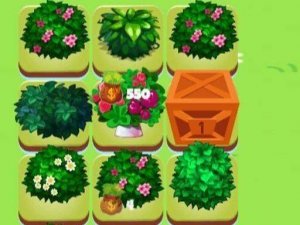
Merge Plants Puzzle Game invites you to a world of botanical discovery. The core mechanic is simple: combine two identical plants to grow them into a new, more advanced plant. As you merge, you unlock a variety of colorful plant species, each with a unique appearance. Designed for all ages, the game offers a relaxing yet engaging experience that tests your observation and planning skills. There are no time limits or penalties, so you can enjoy merging at your own pace. Whether you have a few minutes or an hour, Merge Plants provides a satisfying escape into a garden of endless possibilities.
How to Play
To play, tap or click on a plant to select it, then drag it onto another plant of the same type. When two similar plants touch, they merge into a brand new plant, often larger and more vibrant. Keep merging to unlock higher-level plants and fill your garden with unique flora. The game board is your canvas, and you can rearrange plants freely to plan your merges. There are no penalties for mistakes, so feel free to experiment. The goal is to merge as many plants as possible and discover all the hidden species. It is easy to learn but offers depth for those who enjoy optimizing their garden.
Game Features
Relaxing gameplay with no time limits or pressure. Colorful and charming plant graphics that evolve as you merge. Endless merging fun with many species to discover. Simple drag-and-drop controls suitable for all ages. Free to play with no penalties for mistakes.
Tips for Success
Plan your merges by grouping similar plants together before combining them. This helps you see potential matches and avoid clutter. Take your time—there is no rush, so you can think through each move. Experiment with different arrangements to discover new plant types. Focus on merging the lowest-level plants first to gradually build up your collection. Regular play will help you learn the growth patterns and optimize your garden.
Compatibility
Faq
Is Merge Plants Puzzle Game free to play?
Yes, the game is free to play. There are no upfront costs or mandatory purchases. Optional in-game items may be available, but they are not required to enjoy the full merging experience.
Can I play Merge Plants Puzzle Game offline?
Many casual merge games can be played offline, but this may depend on the specific version. Check the app or game settings to see if an internet connection is required. Typically, such games are designed for offline play.
Does the game have a time limit?
No, there are no time limits in Merge Plants Puzzle Game. You can merge plants at your own pace without any pressure. This makes it a relaxing experience suitable for short or long play sessions.
What happens if I make a mistake while merging?
There are no penalties for mistakes. You can freely experiment with different merges and rearrange plants on the board without losing progress. This encourages creative play and exploration.
Are there different levels or stages in the game?
The game may feature a progression system where you unlock new plant species as you merge. Some versions include levels or stages, but the core focus is on continuous merging and discovery rather than strict level-based challenges.
Can I play Merge Plants Puzzle Game on multiple devices?
Cross-device support depends on the specific version. If the game saves progress to a cloud account, you may be able to continue on different devices. Check the game's settings for sync options.