
Reviews
Pixel Puzzle Assembly delivers exactly what it promises: a straightforward, relaxing jigsaw game with a charming pixel aesthetic. The three difficulty levels cater to both casual players and those seeking a longer challenge. Its browser-based nature means zero setup, and the touch-friendly controls work well on phones. The gradual unlock system provides satisfying progression without pressure. While not groundbreaking, it excels as a polished, family-friendly time-filler that respects the player's pace.
About this game
Building Images from Scattered Pieces
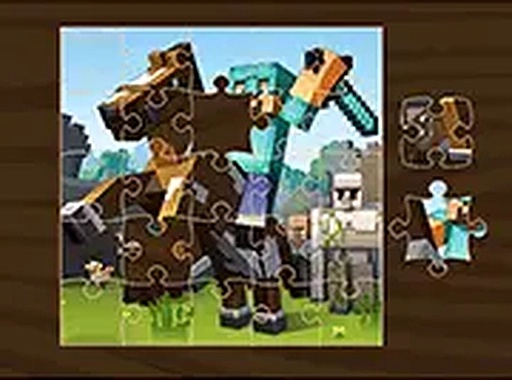
At its core, this game asks players to reconstruct complete pictures from a set of fragmented tiles. Each puzzle presents a unique scene rendered in a blocky, pixelated style. The challenge lies in identifying where each piece belongs, testing spatial awareness and pattern recognition. Players can rotate pieces if needed, adding a layer of strategy to the assembly process.
Difficulty Options for Different Play Styles
Three preset difficulty levels accommodate various skill levels. The easiest setting uses fewer pieces, making it ideal for quick sessions or newcomers. The medium option offers a balanced challenge, while the hardest setting increases the piece count significantly, requiring more time and concentration. This structure allows players to gradually build their skills or jump straight into a tougher puzzle.
Seamless Cross-Platform Play
The game runs entirely within a web browser, eliminating the need for any software installation. It works smoothly on both desktop computers and mobile devices, with touch and mouse input supported. A full-screen mode is available for those who prefer an uninterrupted view. The interface remains clean and intuitive across all screen sizes.
Progression and Reward Loop
Completing a puzzle unlocks the next image, creating a natural sense of advancement. Each finished picture reveals a new pixelated scene, encouraging continued play. The system provides clear goals without pressure, allowing players to move at their own pace. This gradual unlocking keeps the experience fresh without overwhelming the user.
Relaxed Pacing and Accessibility
The game emphasizes calm, methodical play rather than speed or competition. There are no timers or scoring systems that rush the player. This design makes it suitable for all ages, from young children to older adults. The simple drag-and-drop controls require no prior gaming experience, ensuring anyone can start playing immediately.






Comments
Sign in to leave a review
No account? Create one
No comments yet.